

Understanding My Bill
We understand that your tuition bill may seem complex at first. This page offers a clear breakdown of each section, so you can easily see where your funds are being applied while attending Stetson University.
- Top of the Bill
- Charges, Credits and Anticipated Credits
- Billing Summary
- Making Your Payment and Due Date
- Refunds
1. Top of the Bill
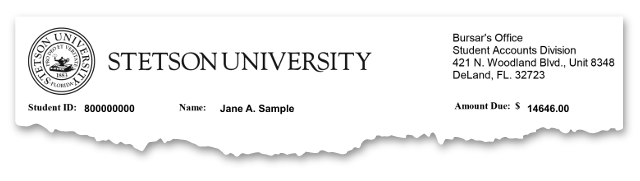
The top of the bill will always have your Stetson University ID number, your name and the total amount due. That way, you know the amount due to Stetson right up front.
2. Charges, Credits, Anticipated Credits and Late fees
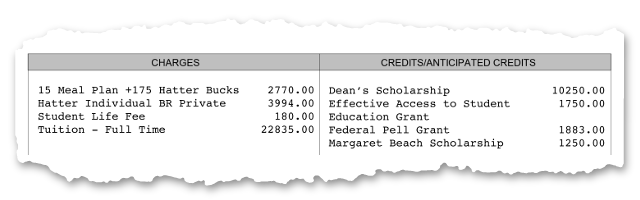
Charges: This section includes your semester tuition, housing, meal plan, student life fee, and any other additional charges such as the orientation fee, course fees, parking passes, and fines.
Credits/Anticipated Credits: This section lists all your payments, deposits, loans, scholarships, and grants that are applied to reduce your balance. To ensure you are receiving all sources of aid that you are eligible to receive, make sure you have accepted all available aid and that all your financial aid documents are complete. You can review your One Stop Checklist on MyStetson to see if any required items are still pending and preventing your aid from being dispersed.
For specific billing questions or discrepancies, please contact the appropriate office:
- Financial Aid: 386-822-7120, [email protected]
- Housing: 386-822-7201, [email protected]
- Meals: 386-822-7782, [email protected]
- Student Accounts: 386-822-7050, [email protected]
3. Billing Summary
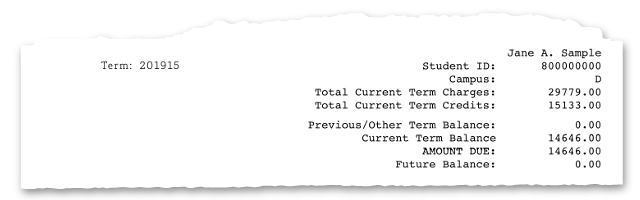
Total Current Term Charges: This is the total amount for the current semester, including all charges listed in the Charges section above.
Total Current Term Credits: This represents the total credits for the current semester, including all payments, loans, scholarships, and grants listed in the Credits/Anticipated Credits section above.
Previous/Other Term Balance: This is any student account balance carried over from a previous term, which can be either an amount due or a credit.
AMOUNT DUE: This is the total amount that must be paid in full by the due date.
Future Balance: This shows the total charges or credits that will be due or available in the future. It often includes the remaining balance for your monthly payment plan for upcoming months.
4. Making Your Payment and Due Date
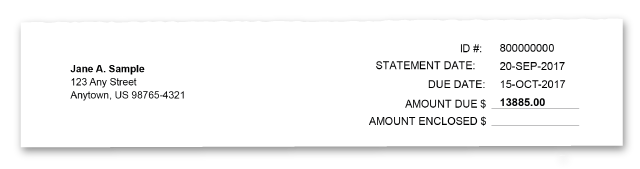
If Mailing in payment, please detach the portion of the bill below the line and include it with your payment. Be sure to confirm that your Student ID number is correct to ensure your payment is processed properly.
Due Date: Payment must be received by the close of business on the due date listed on your bill. Failure to pay by this date may result in a 2.5% late fee and restrictions on services such as registration and transcripts.
5. Refunds
Refunds: If your payment and financial aid exceed the Total Current Term Charges after all credits have been applied, you will be issued a refund. You can choose to receive your refund via direct deposit or as a paper check (see below). Refunds are typically processed by Financial Aid after the Course Add/Drop Deadline for the term (Academic Calendar). Please keep in mind that refunds from Financial Aid will not be available until your enrollment has been confirmed.
Refunds will be processed within 14 days after your financial aid is applied to your student account, provided there are no outstanding requirements. Approved refunds will be sent to Accounts Payable for processing.
- If you have set up Direct Deposit with the university, your refund will be automatically deposited into your linked bank account, and you'll receive a confirmation via email.
- If you prefer to receive your refund by check, you will receive an email notification when the check is ready for pickup at the Finance Office (located in the Administrative Services Building at the corner of East Wisconsin Avenue and North Amelia Avenue). You must present a photo ID to pick up your check.
What is a student account refund?
A refund may occur when credits applied to your student account exceed the charges that can be paid with those funds.
Credits may include financial aid, scholarships, loans, stipends, payments, or other adjustments.
When an eligible credit balance remains after required account and financial aid reviews are completed, the excess funds are refunded to you.
What is a Title IV credit balance?
Title IV funds include federal financial aid such as Federal Pell Grants and Federal Direct Loans.
A Title IV credit balance generally occurs when Title IV funds applied to your account exceed the charges those funds are permitted to pay.
Allowable charges generally include current-term tuition and required fees, university housing and meal plan charges, and certain other educational charges when authorized.
Federal regulations require Title IV credit balances to be refunded within specific timeframes unless the university is authorized and permitted to hold the funds.
Does having a credit balance automatically mean I will receive a refund?
Not always. A credit balance shown on your account does not necessarily represent the amount you will receive as a refund.
Before funds are released, Student Accounts reviews the account to confirm refund eligibility. This may include reviewing:
- Financial aid eligibility
- Enrollment or account changes
- Pending charges or adjustments
- Monthly payment plan obligations
- The source of the credit balance
Some accounts also require review by Financial Aid before a refund can be released.
When does refund processing begin?
Student Accounts begins its regular refund process following the Add/Drop deadline published in the Academic Calendar. Eligible refunds are reviewed and processed weekly throughout the term.
Title IV credit balances are processed in accordance with applicable federal timelines, which may require funds to be released earlier.
Why does regular refund processing begin after Add/Drop?
Enrollment changes can affect financial aid eligibility and student account charges. Beginning regular refund processing after Add/Drop allows enrollment and account activity to stabilize before excess funds are released.
This does not delay refunds that must be issued earlier under federal Title IV requirements.
Can I leave my credit balance on my account for future charges?
Students may authorize the university to retain certain credit balances for future eligible charges.
However, federal regulations limit how long Title IV funds may remain on a student account. If federal requirements require the university to release the funds, the credit will be refunded even when the student has requested that it remain on the account.
How long does it take to receive my refund?
Processing time varies depending on account activity and any required reviews.
Once your refund is approved and processed:
- Direct deposit refunds are generally received faster.
- Paper check refunds require additional processing through Accounts Payable.
You will receive communication when your refund has been processed.
Why is my refund taking longer than expected?
Refund timing may be affected by financial aid review, enrollment changes, pending account activity, payment plan participation, or other adjustments affecting your account.
Student Accounts and Financial Aid work together to ensure refunds are accurate and processed within applicable federal requirements.
How will I receive my refund?
- Direct Deposit (Recommended)
If you have direct deposit established with the university, your refund will be electronically deposited into your designated bank account. Student Accounts will notify you when the refund has been processed. - Paper Check
If direct deposit is not established, your refund will be issued by check through Accounts Payable. Accounts Payable will contact you by email with instructions for receiving your check.
How do I set up direct deposit?
Students should maintain current direct deposit information with the university.
To establish direct deposit, complete the online ACH/Direct Deposit Form.
I have a monthly payment plan. Can I still receive a refund?
Possibly. Student Accounts reviews payment plan obligations when determining refund eligibility.
Depending on your account activity and the source of the credit, funds may be applied toward eligible account obligations before an excess amount is refunded. Title IV funds remain subject to federal refund requirements.
How can I check whether I have a credit balance?
Review your student account activity and balance through the student portal.
A credit balance generally appears as a negative balance. However, the amount shown as a credit does not necessarily represent the amount you will receive as a refund.
How do I check my Student Account activity and balance?
Follow the instructions in our Check Your Student Account guide.
Who do I contact if I have questions about my refund?
Office of the Bursar (Student Accounts)
Phone: 386-822-7050
Email: [email protected]